Software — Theralon

Scio

Ask the operation. Act on the answer.

Scio is how people work with the live model of the operation. Ask it anything about the operation and it answers from the organisation's own data, with every figure traced to its source. Ask for a document and it builds it, for whatever dates you name. Tell it what needs doing and it prepares the change on the screen where it belongs, or sets it up as a workflow — and nothing happens until a person approves it.

Works across Terra and Vigil, for everyone who runs, oversees or answers for the operation.

Built around your data, your systems and how you actually operate, at whatever size the operation is.

From a question to a decision

Watch it work.

Synthetic data
  1. 01 AskWhat should we do? Scio answers with the gaps that matter, each with its figures.
  2. 02 Set up“Set that up” turns the recommendation into a workflow of steps.
  3. 03 ApproveEach step waits in Decisions with the logic behind it, until a person approves it.
  4. 04 AssistOn Command, Scio reads the selected site and prepares the relief move.

With Scio

What everyone can do with it.

  1. 01

    Ask in plain language.

    About any site, carrier, period, risk or decision in the operation.

  2. 02

    Get figures you can trace.

    Every number computed from your own data, and checked before it is shown.

  3. 03

    Turn the answer into action.

    A move, an owner, a workflow, prepared and waiting for a yes.

  4. 04

    Keep a person in charge.

    Nothing is carried out until someone approves it, and the record keeps who did.

Inside Scio

From a question to a decision.

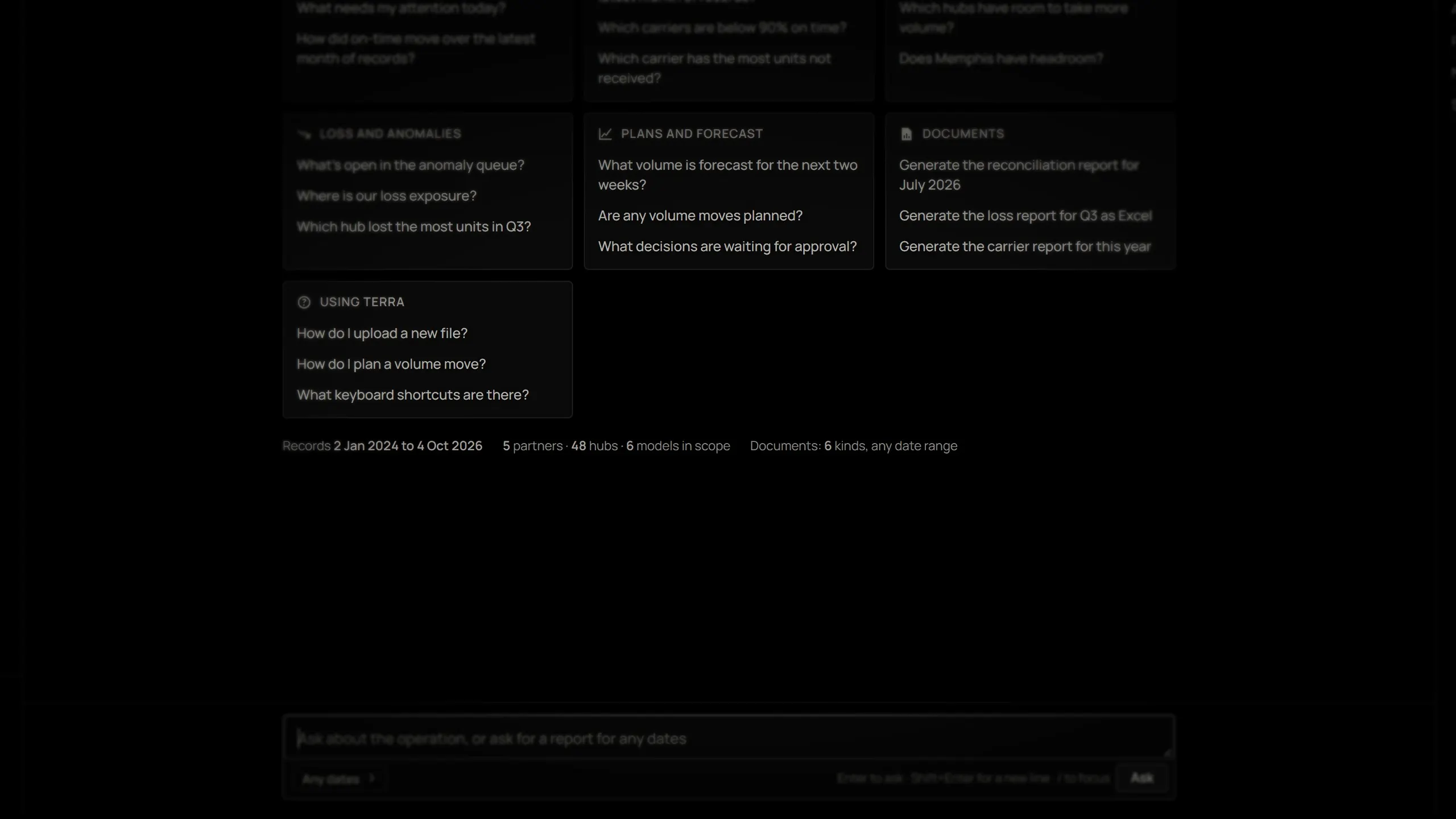
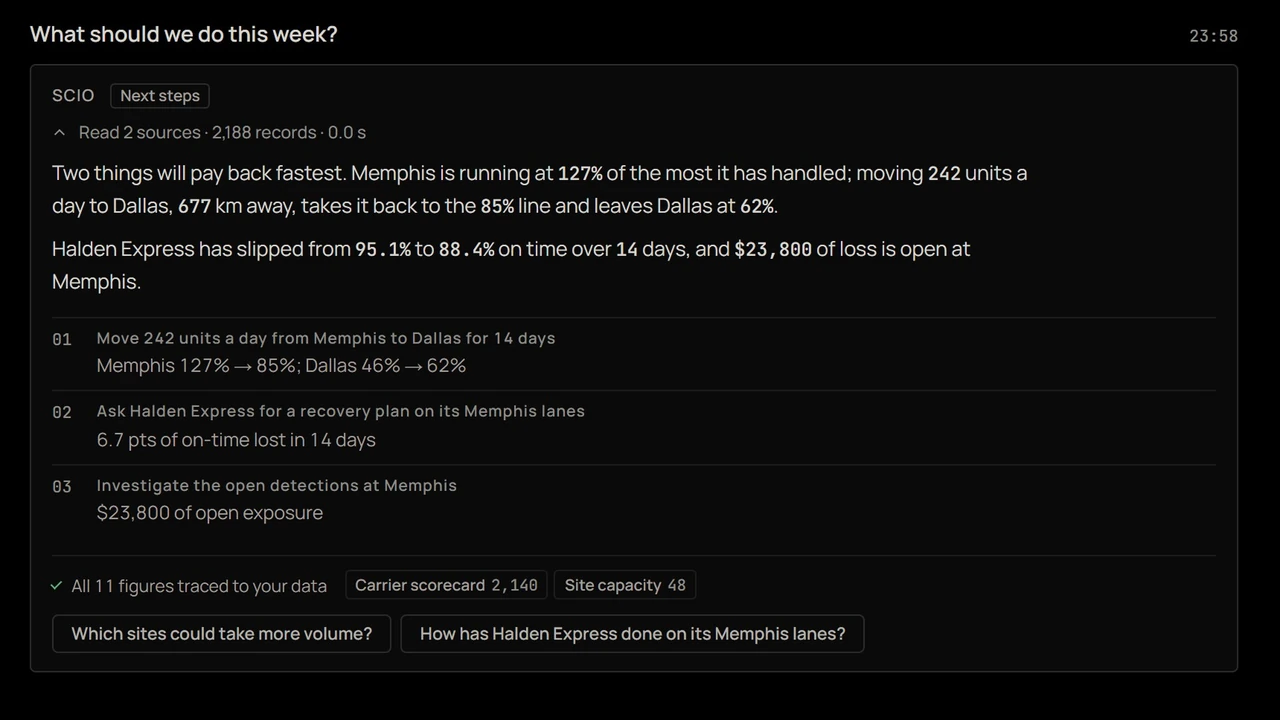
Scio answering what the operation should do this week.

01 — Ask

Ask what to do, and get the reasons.

Scio reads the figures it needs from the live model and answers from them: what will pay back fastest, each claim with its figure and its source.

  • Answers from your own computed figures
  • Shows what it read to answer
  • Runs inside your own environment
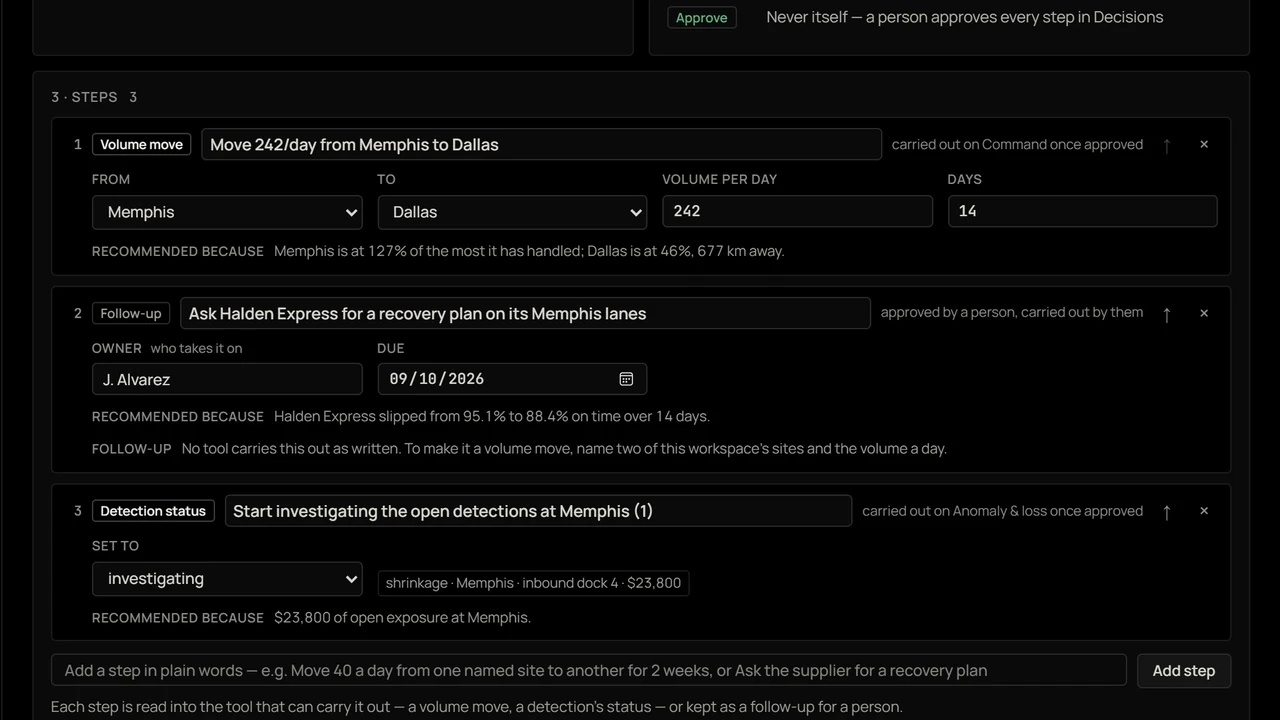
A recommendation set up as a three-step workflow in Scio.

02 — Set up

From advice to a workflow in one sentence.

“Set that up” turns the recommendation into a workflow of steps, the volume move, the follow-up with the carrier, the investigation, each with what carries it out.

  • Recommendations become steps
  • Each step names who or what acts
  • Nothing runs until it is approved
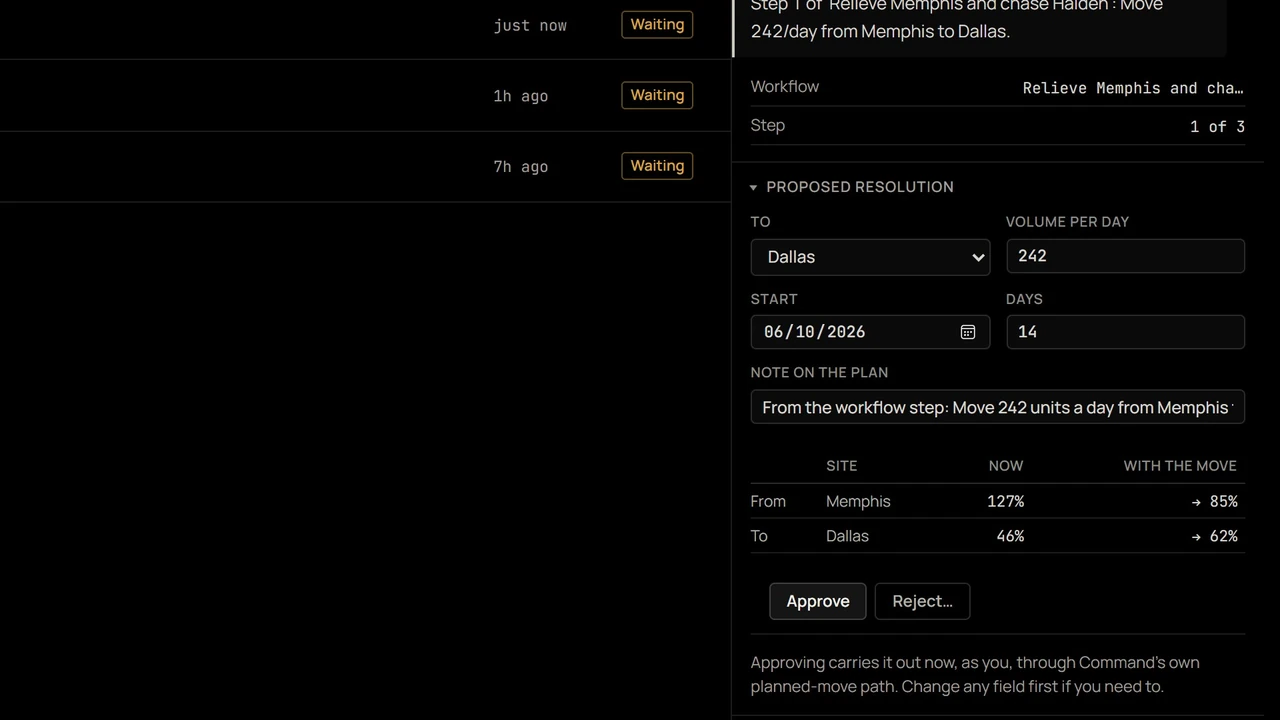
A proposed volume move waiting for approval in Decisions.

03 — Approve

Every step waits for a person.

Each step arrives in Decisions with the logic behind it and its effect on both sites. Approving carries it out through the product's own screens.

  • The logic behind every step
  • Change any field before approving
  • Who decided, what changed and why, kept
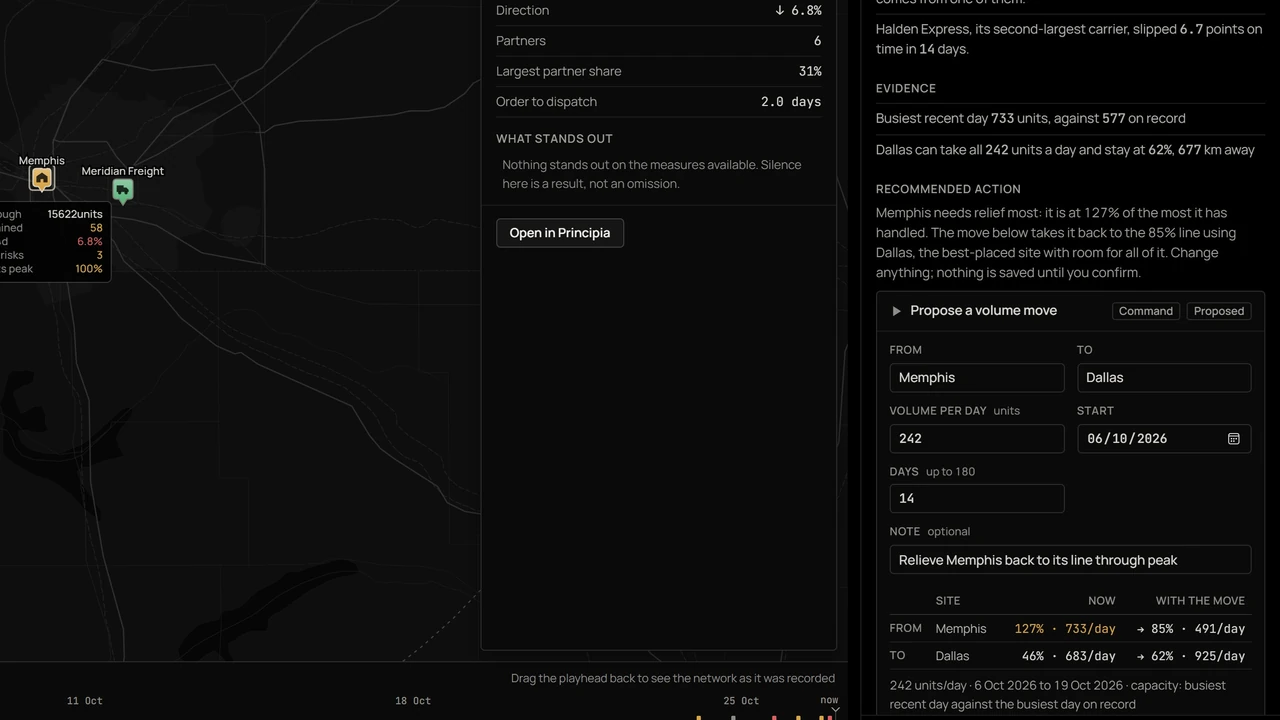
Scio assisting on a selected site in Command, with a relief move prepared.

04 — Assist

On the screen, the context already read.

Open Assist on Command and Scio reads the selected site, its load, its partners and what stands out, and prepares the relief move with every field editable.

  • Reads what is selected
  • Offers that screen's own actions
  • Saves nothing until you confirm

Screens from the product, on synthetic data.

How it works

From a question to a decision.

  1. 01

    Ask

    In plain language, about anything in the operation: a site, a carrier, a period, a risk, a decision. Scio reads the figures it needs from the live model and answers from them, with its sources attached.

  2. 02

    Prepare

    Asked to act, it prepares the change — a volume move, a status, an owner, a schedule, a set of steps — with every field editable and its effect shown before anything is saved.

  3. 03

    Approve

    A person approves, changes or rejects it. Approving carries it out through the product's own screens, and the record keeps who decided, what changed and why.

Grounding

Every figure traced, or it isn't said.

Scio never works out a figure of its own. The figures and comparisons in an answer are computed by the platform from the operation's own data, and every number and date Scio writes is checked against them before it is shown. A sentence that cannot be traced is removed, and the answer says so. Scio runs inside the organisation's own environment: questions, answers and records never leave it.

How answers are grounded →

Capabilities

What Scio does.

  • Answers from the live model.

    Sites, lines, machines, suppliers, carriers, shipments, work orders, losses, risks, decisions and forecasts, for any period and in the operation's own words, answered from the same model every screen runs on, with the sources one click away.

  • Writes the documents.

    Any of the platform's reports for any dates — a quarter, last month, a range — as PDF, Excel, CSV or JSON, named for its period and kept on record.

  • Assists where the work is.

    Open Assist on Command, Decisions, Risk, Forecasting or Principia and Scio reads what is selected there — the site, the risk, the decision — explains it, and offers that screen's own actions for it.

  • Prepares, never presumes.

    A move, a status, an owner, a ruling: prepared with every field editable and its effect previewed, carried out only when a person confirms, and undone where the record allows.

  • Automates with guidance.

    Give Scio a standing instruction — the alert to watch for, the tools it may use, how to resolve it — and it proposes a resolution as each alert arrives, with the logic it followed. Out of the box, each new loss, slipping partner or unusual stop is raised once, with the action that answers it.

  • Turns advice into workflows.

    Ask what to do, then tell Scio to set it up. Its recommendations become a workflow of steps, each sent to Decisions for a person to approve and kept in Decision memory.

In Terra

  • Command
  • Decisions
  • Anomaly & loss
  • Forecasting
  • Reconciliation
  • Principia
Explore Terra →

In Vigil

  • Risk
  • Risk controls
  • Reports
  • Principia
Explore Vigil →

What changes

Exporting a report to answer a question

Asking the question

A recommendation someone still has to action

The action prepared, waiting for a yes

Rules that act without anyone seeing why

Proposals that show their logic and wait for a person

How to start

Ask your own operation.

  1. When a customer asks why their shipment is late, can your team answer in minutes, including who else the same problem affects?
  2. Can anyone ask your systems that question in plain English and get an answer with the numbers traced?

Scio does both. Show us where the operation breaks down. We build around your data, your systems and how you actually operate, at whatever size the operation is. Then compare it with what you run today.

You bring
The questions your team spends the day chasing, someone who knows how the operation runs, and the data around it: exports, spreadsheets, EDI or APIs. Imperfect data is fine.
We bring
Scio, built around your data, your systems and how you actually operate, and a walkthrough answering your own questions from your own operation.
Cost
There's no cost while we work with you, for the foreseeable future. You see what the software does on your own operation before it costs you anything.
Then
Terms are agreed only once you have seen what the software does on your operation. They are sized to what you run, not to us, and nothing becomes a contract until you agree to it.

Your data

  • Used only for your operation. It is never shared with, or used for, anyone else.
  • No third-party models. Questions are answered inside your environment; nothing goes to an outside model provider.
  • An NDA first, before you send anything, if you want one.
  • Where it is processed is named before any data moves, and access is limited to the people working on your operation.
  • Deleted on request.

Questions

What people ask about Scio.

Is Scio a chatbot?

No. Scio answers only about the operation, from the operation's own live model, and acts only through the product's own screens. Asked about something outside the operation, it says so rather than guessing.

Can Scio change anything on its own?

No. Every action, proposal and workflow step waits for a person. Approving runs the same path the screen itself runs, as the person who approved it, and the record shows that it came through Scio.

How do we know an answer is right?

The figures in an answer are computed by the platform from the organisation's own data, and every number and date Scio writes is checked against them before it is shown. A sentence that cannot be traced is removed, and the answer lists what was removed. The sources behind every answer are one click away.

Does our data leave our environment?

No. Scio runs alongside the platform in the organisation's own environment. No question, answer or record is sent to an outside service.

How do we start?

Show us where the operation breaks down. We build Scio around the systems you already run, answer your own questions from your own operation, and you compare it with what you run today.

What does it cost?

Nothing while we work with you, for the foreseeable future. You see what the software does on your own operation first. When it has shown its value there, we agree terms with you, sized to what you run, and nothing becomes a contract until you agree to it.

Why is there no cost?

Because the software is best judged on your own operation, not on our word. It isn't a trial or a pilot: you see what it does on your own data first, and when it has shown its value there, we agree terms with you.

What does it cost once the software has shown its value?

Terms are agreed only after you have seen what the software does on your own operation. They are sized to what you run: how much of the operation the software covers, the volume and the number of sites, not the size of Theralon. You start with the product that fits the problem in front of you and add the rest when it has earned it. Nothing becomes a paid contract until you agree to it. The same software runs owner-led operations and large ones alike.

Is Scio only for large operations?

No. We build around the operation in front of us, at whatever size it is, and it costs nothing while we work together.
Also from Theralon

Terra & Vigil

Terra runs the operation. Vigil tells leadership what it is exposed to, and proves it. Scio is how people ask both, and act.

Explore Terra → Explore Vigil →